Quality management is a critical success factor for companies in the manufacturing industry. Rising customer expectations, complex supplier networks, and regulatory requirements make it necessary not only to document inspection processes thoroughly but also to manage them digitally end-to-end.
In an exciting project, we were able to support a customer in the manufacturing industry for the first time in migrating their quality management functions to SAP S/4HANA Cloud Public Edition using SAP Quality Management (QM). The goal was to set up the entire inspection planning within the goods receipt inspection process and to implement in-process inspections as well as initial sample inspections.
The focus was not only on the technical requirements but also on how the user interface and processes in SAP Cloud ERP differ from those in the on-premises system from the perspective of both consultants and users (SAP Fiori vs. SAP GUI).
This blog post explores the similarities and differences between SAP GUI and the new SAP Fiori user interface in the cloud, provides insights into the systems, and highlights the challenges and experiences the customer encountered during this project from both a consultant’s and a user’s perspective.
Quality Management in SAP Cloud ERP: New approaches, same goals
From a consultant’s perspective, it was fascinating to identify the unique features and differences in the user interface and customization options with SAP Fiori, and to find appropriate settings and solutions for the client’s requirements in SAP Cloud ERP.
In quality management in particular, the challenge often lies in the fact that companies have developed highly customized inspection processes over the years. In SAP Cloud ERP, however, the focus is more strongly on standardization and clear process guidelines.
The benefits for the client were clear: The company had not previously used a quality management system in SAP, which is why requirements for materials, personnel, and documentation had been poorly documented and inconsistently maintained. With the implementation of SAP QM, all inspection characteristics – that is, specifications for how and what must be inspected – were to be centrally consolidated in inspection plans and inspected uniformly from that point forward.
The new user interface: SAP Fiori vs. SAP GUI
A key difference between on-premises and SAP Cloud ERP lies in the user interface. In the classic SAP GUI, users accessed Customizing via the SAP Project Reference Object (SPRO) transaction through the Implementation Guide to obtain an overview of all Customizing and customization options in the Quality Management area (see Figure 1).
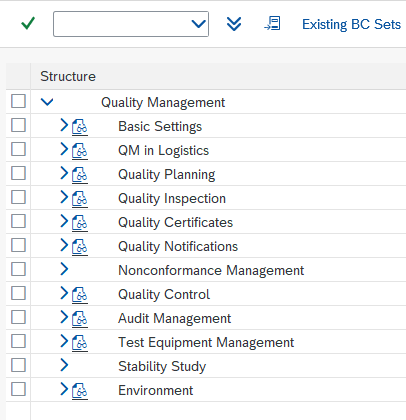
Figure 1: Structure of the SAP GUI Implementation Guide in SAP ECC
In SAP Cloud ERP, however, configuration is performed via the SAP Fiori app “Configure Solution.” At this point, the interface differs to make operation more efficient (see Figure 2). Quick access and search functions, as well as desired nodes, can be found via Enterprise Search. You receive an overview including the scope of application and brief descriptions, which can be filtered according to personal needs and also saved as variants.
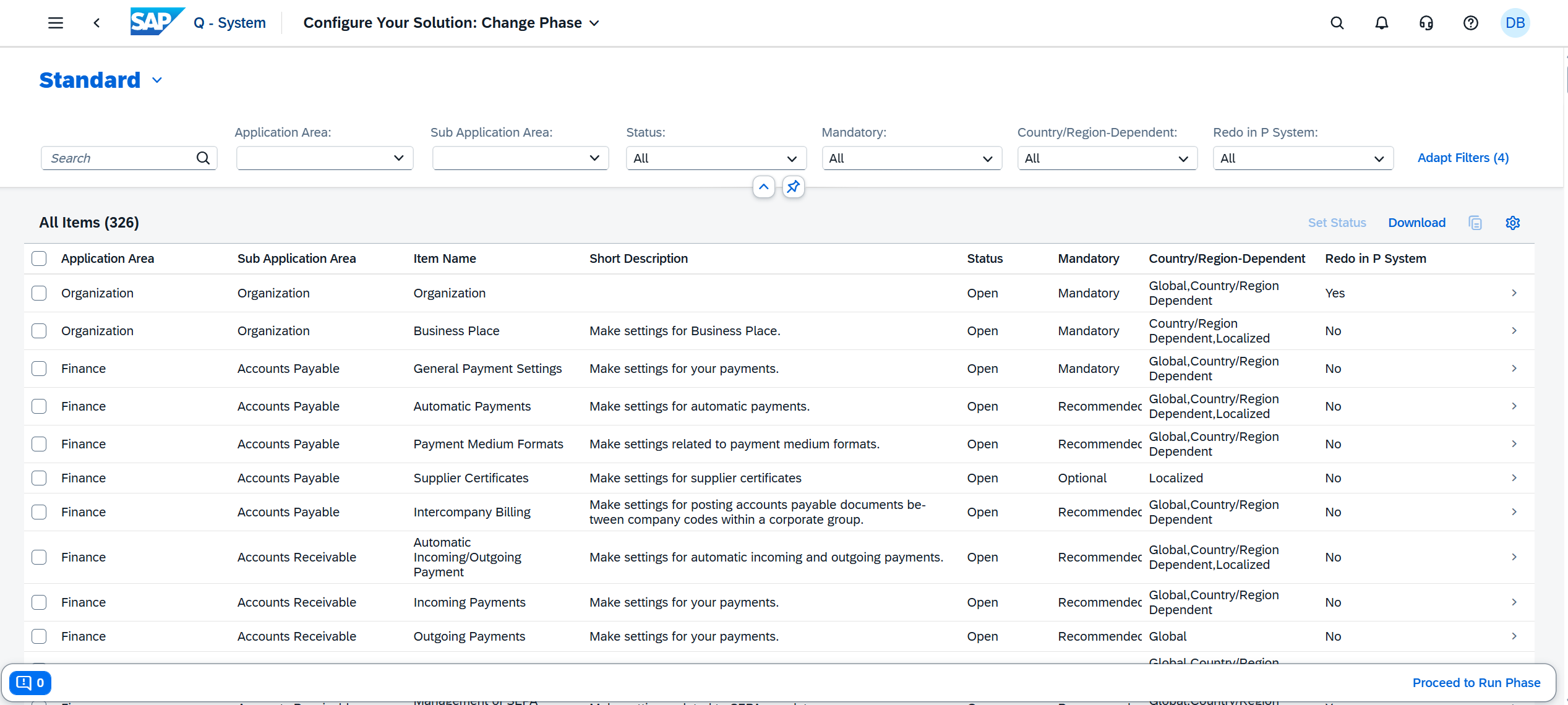
Figure 2: User interface of the Fiori app “Configure Solution” in SAP S/4HANA Cloud Public Edition
The “Scope” tab provides quick, direct access to each module or area and, in our case, displays all elements and sub-groups of Quality Management (see Figure 3).
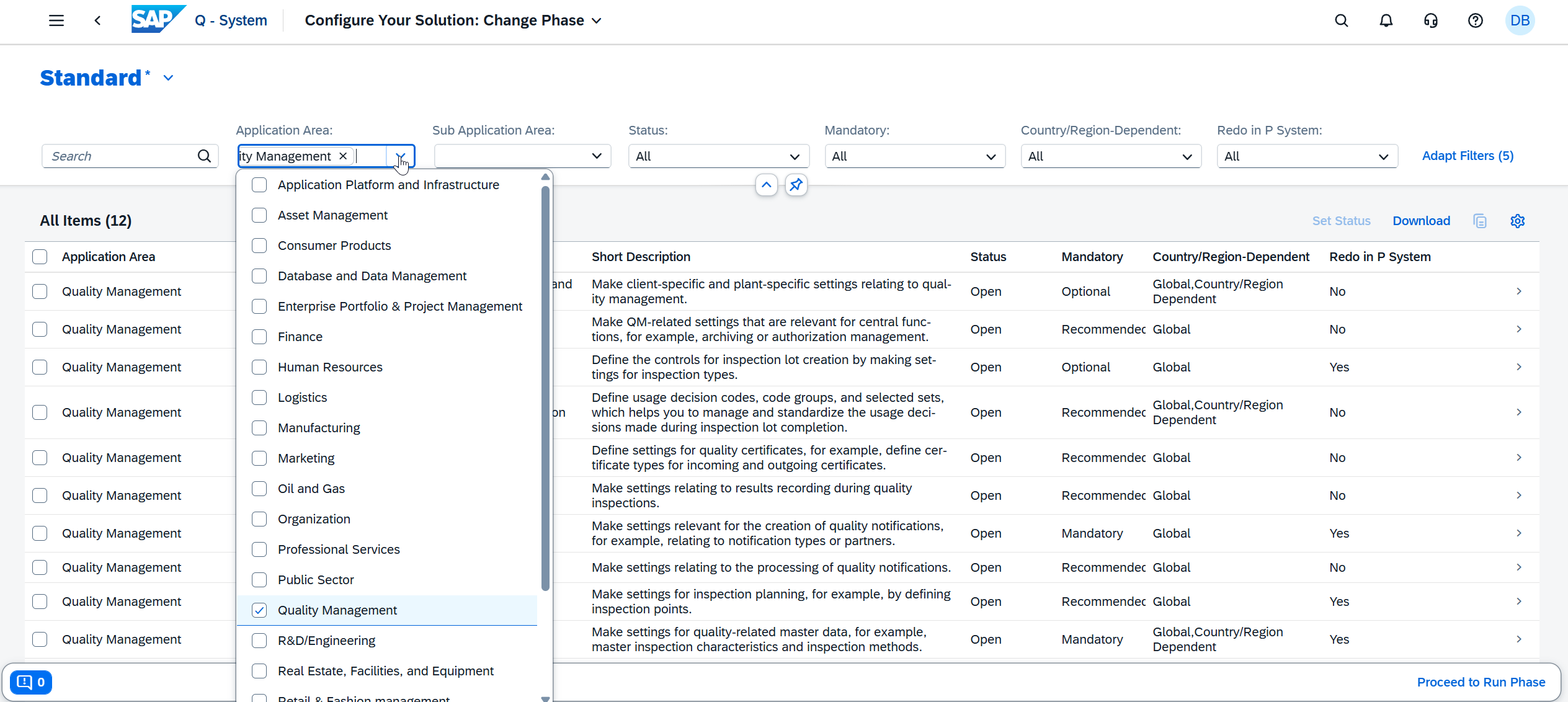
Figure 3: Search for the “Quality Management” application area
So far, there aren’t any major differences from SAP GUI, except for the customized user interface (see Figure 4 vs. Figure 5). Some basic settings in SAP Fiori on the SAP QM side at the plant level also correspond to the options available in SAP GUI. Here, you can decide in the basic data whether master inspection characteristics and inspection methods are maintained with or without history. Likewise, the settings for inspection lot creation and results recording are available in the same way.
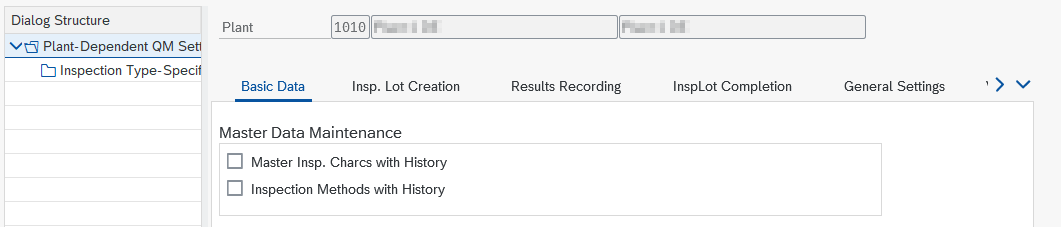
Figure 4: SAP ECC Basic Settings (SAP GUI)
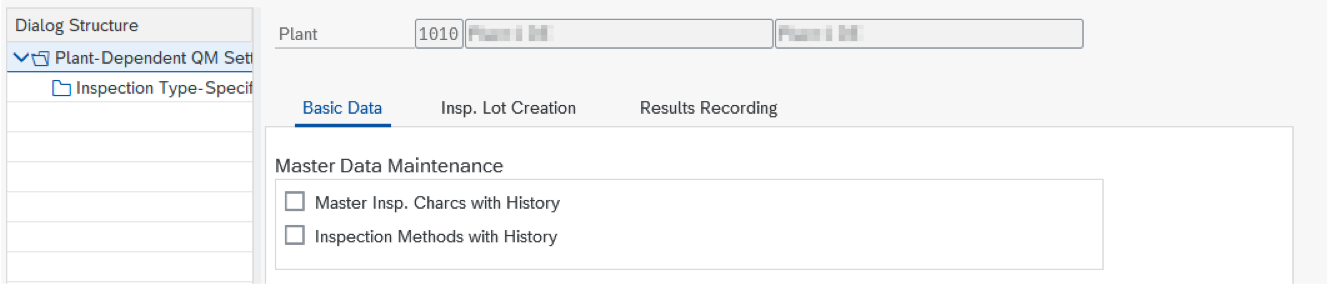
Figure 5: Basic Settings for SAP S/4HANA Cloud Public Edition (SAP Fiori)
Differences between SAP Fiori and SAP GUI in QM customizing
In SAP Cloud ERP, the basic settings at the plant level end with results recording at this point. However, this also means that the sections “Inspection Lot Completion,” “General Settings,” and “Visual Planning” are no longer available in the Fiori environment (see Figures 6 through 8). These were not essential settings within the scope of our project; nevertheless, it should be noted that not every familiar customizing option is available in the same form at the plant level anymore.
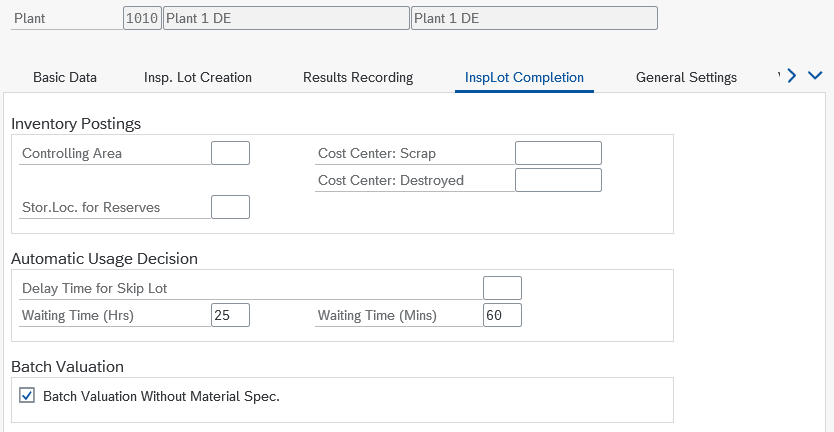
Figure 6: “Inspection Lot Completion” tab in SAP ECC

Figure 7: “General Settings” tab in SAP ECC
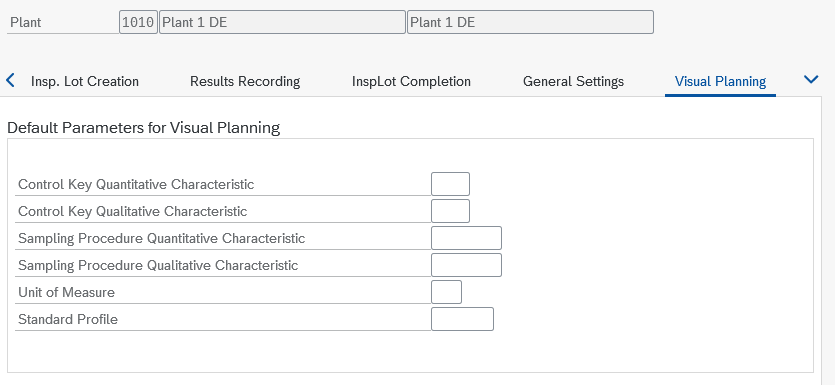
Figure 8: “Visual Planning” tab in SAP ECC
However, what was also missing for our customer at this point were the additional settings (see Figure 9), which cannot yet be fully implemented in the cloud.
Some settings can, however, be configured at the tenant level as an alternative, meaning the key here is to understand the new system logic and identify the correct settings.
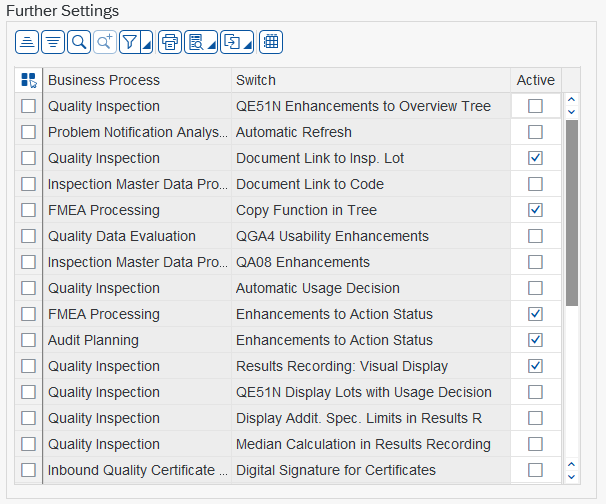
Figure 9: Additional settings in SAP ECC
For example, the “Table Maintenance” transaction is now only available in a different location in Cloud ERP than before, which plays an important role in custom developments for clients but was not relevant to this project.
One change affecting our project concerned “transport requests.” In SAP GUI, changes to transport requests could previously be made to the system settings, which were then saved on a project-by-project basis in so-called change requests. After successful testing, these change requests could be used to transfer the system settings to other SAP systems. The change requests were managed in the transport organizer. However, this differs in the cloud. All changes made during customizing are saved in the system as so-called transport requests in the “Projects” area. These projects must then be executed by the administration and are no longer within the scope of the consultants. This change requires more coordination and must be taken into account in the schedule.
There is also a new process for first-article inspection: There is no longer a specific inspection type designated for initial samples, as was previously the case; instead, the initial sample inspection is now also handled via the standard goods receipt inspection for the purchase order. It is important to note that the inspection plan must be adapted to the corresponding use.
These differences clearly demonstrate that SAP Cloud ERP relies more heavily on harmonized standard processes rather than separate custom solutions.
Capabilities of SAP Cloud ERP from a consultant’s perspective
The key question is often: What level of functionality can SAP Cloud ERP deliver, and how much of it can be implemented out-of-the-box?
Our project experience has shown that, in principle, a wide range of functions from the existing SAP standard system can be implemented in the Public Edition, and no essential functions were missing for the client’s project. This means that all necessary functions for typical standard QM processes such as
- Incoming goods inspection
- In-process inspection
- Certificate processing
are available and implementable.
The processes and paths to the result are partly new and differ from what we were used to in the SAP GUI, but they were fully implementable in this project from a functional standpoint. The project enabled us to make intensive use of SAP Cloud ERP and to gain practical experience with the new features and differences.
User experience report from a new user’s perspective
As a new user, the customer had not previously used Quality Management in SAP. The initial situation was as follows:
- No planning or control in goods receipt inspection
- Inspections without defined characteristics
- Insufficient documentation
Quality management is particularly important in industries with a high proportion of purchased goods and a large supplier network, as constantly evolving customer requirements and industry-specific processes, as well as increasing demands on supplier management and goods receipt, also raise the bar for the QM system.
The goal was therefore:
- To plan and control quality inspections directly at goods receipt
- To establish certification-compliant and digital processes
The customer had opted for SAP Cloud ERP (SAP S/4HANA Cloud Public Edition) because this allowed the existing system to be utilized and enabled the direct use of ERP master data and existing processes.
The main challenge was to implement the processes in a lean and straightforward manner, which was well within reach thanks to existing best practices. However, as new users, they also had to understand the SAP workflows within the system in order to adapt them appropriately to their own requirements, which went smoothly with external support. In particular, the legal regulations regarding access and functions had to be thoroughly reviewed and implemented in advance.
From a purely technical standpoint, the prerequisites for an SAP inspection lot (a central document in SAP Quality Management) included defining result catalogs and selection sets for result recording, creating master inspection characteristics (where applicable), developing inspection plans based on these, maintaining the master data in Quality Management, and finally creating the inspection type (in this case, the goods receipt inspection). The inspection lot is consequently created for the first time through a purchase order and the associated goods receipt. Both quality technicians and engineers can then process this inspection lot to assess a potential release.
It should be emphasized at this point that, in particular, extensive testing of the entire process flow from start to finish was, and still is, of great importance, given the inherent complexity and the involvement of various individuals and functions.
Summary
Quality management in SAP Cloud ERP demonstrates that professional, high-level quality management is possible even in the cloud. Companies can map core inspection processes – such as goods receipt inspection, in-process inspection, and first-article inspection – using the standard system, while benefiting from a modern user interface and robust system governance.
Therefore the answer to the question “How much quality is possible with SAP Cloud ERP and the standard system?” is actually “a great deal!” Because the SAP standard already offers all essential functions for end-to-end, digital quality processes in the cloud. However, companies must commit more fully to harmonized workflows and cloud logic. Those willing to consistently use standard processes can establish a powerful and future-proof quality management system with Cloud ERP.
